How we block AI bots from Solr

For a number of clients, we rely on Apache Solr for website search. As soon as you have slightly more demanding requirements – such as searching your own datasets using faceting or implementing a predictive search – Solr offers a wealth of options and flexibility that TYPO3’s own `indexed_search` simply cannot provide.
However, the Solr search is not only of interest to regular users: we are increasingly noticing that bots are using the Solr results pages, for example to collect training data for AI or to fulfil user queries. Our system administrator Alex keeps an eye on the server performance curves and has alerted the team to the increase:
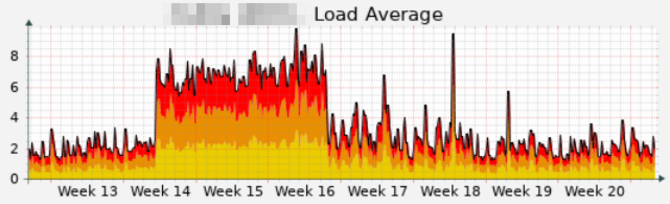
It is clear to see that the server has suddenly become much busier. We are not the only ones observing this phenomenon; dkd (the developers of the TYPO3 Solr extension) have also written a blog post on the subject.
What is going on? A look at the access log sheds some light on the problem. It is rapidly filling up with entries such as the following:
"GET /suchergebnisse/?tx_solr%5Bpage%5D=1&tx_solr%5Bq%5D=Carbon%20Management HTTP/1.1" 200 26448 "-" "python-requests/2.32.5"
"GET /suchergebnisse/?tx_solr%5Bq%5D=Planungsgruppe HTTP/1.1" 200 27161 "-" "-"
"GET /suchergebnisse/?tx_solr%5Bq%5D=Vertriebsassistent+ HTTP/1.1" 200 28964 "-" "Google"
"GET /suchergebnis/?L=0&q=Betriebsordnung&tx_solr%5Bsort%5D=date%20desc HTTP/2.0" 404 224120 "-" "meta-externalagent/1.1 (+https://developers.facebook.com/docs/sharing/webmasters/crawler)"
We’re receiving a huge number of requests from a wide variety of IP addresses, all without a referrer, and all containing a search query. Requests for normal pages on the website are completely lost amongst these search result page views. Furthermore, results pages with various combinations of parameters are being iterated through. Human search traffic looks different, so we can assume that these are bots.
Professional crawlers do at least specify a user-agent, and at best also provide a link with background information. However, many simply claim to be, for example, a standard Chrome browser.
To regulate bot requests to specific areas of the website, the usual recommendation is:
By configuring the robots.txt file on your website, you can specify to the Meta web crawlers how you would prefer them to interact with your site. In order to block these crawlers, add a disallow for the relevant crawler to robots.txt
Of course, we’ve already configured the robots.txt file accordingly, as bots generally have no business being in the search function. However, this setting clearly isn’t helping, as many bots don’t adhere to these guidelines.
Where do the requests come from? One evening, I compiled a list of IP addresses from the logs that had used the Solr search at 4 am. The result: around 31,000 different IP addresses. Manual blocking won’t get you very far here, especially as it can only be done reactively once the flood of requests has already brought the server down.
Not all DDoS attacks are the same
That sounds like a lot, but ironically, it’s not enough. When hosting providers advertise ‘DDoS protection’ or ‘AI-powered DDoS detection’, they usually only mean the network layer. ‘Oh yes,’ says support, ‘your server is accessible. It’s just that your application is too slow.’ Great. Thanks for nothing.
The network can handle all these requests without any problems – yet nobody can see the website anymore because the server takes too long to process the requests. The recommendation is often to use Cloudflare on the free plan. This is a solution insofar as the requests no longer bombard the server directly, but are routed via Cloudflare first. Only the requests that Cloudflare deems legitimate are ultimately sent to the web server. It’s an option, but you don’t necessarily want to tie yourself to the data protection issues associated with an American service provider — not to mention the costs if the free plan is no longer sufficient.
Nobody expects JavaScript
The TYPO3 Association has also already implemented measures against bot traffic. For example, when you visit extensions.typo3.org, this image flashes briefly:

This mascot belongs to Anubis, a proxy service that uses JavaScript to make the web browser perform a small calculation (known as a ‘proof-of-work’) before displaying the actual website. Anyone who invests this processing time is granted access, whereas bots generally do not.
The problem here, however, is that the entire website then becomes inaccessible to legitimate bots as well, such as Google Search crawlers. Of course, exceptions can be configured, but just as easily, ‘malicious’ bots could pose as legitimate ones.
So, rather than using an upstream service provider or an additional application, we solve the problem within TYPO3:
Please open a ticket!
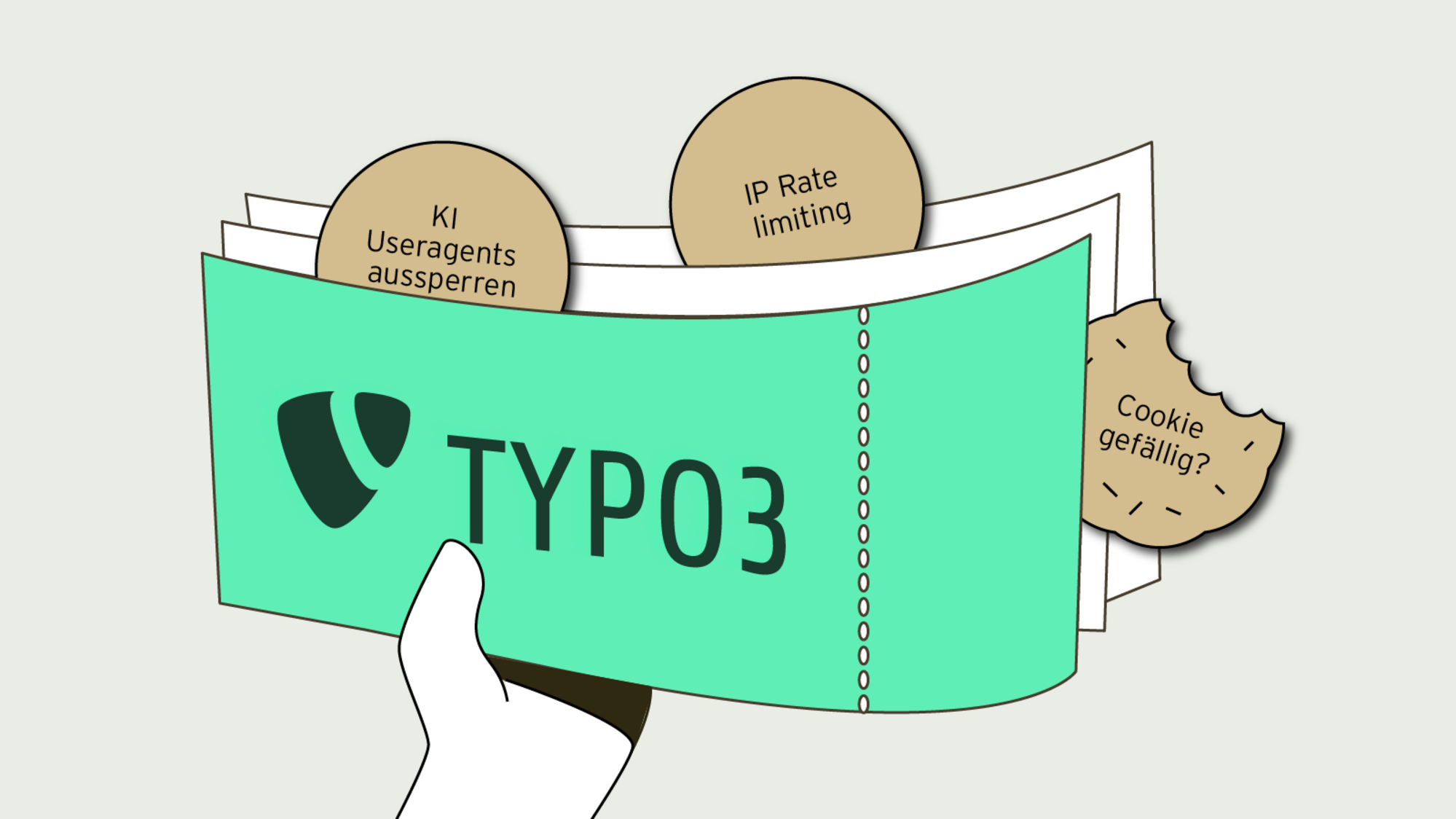
Our solution is a TYPO3 middleware module. Based on the URL being accessed, the system first checks whether the middleware should be activated at all. In principle, only requests that intend to use the search function are considered – that is, those containing a URL parameter that includes `tx_solr`. If this is the case, we have several filtering levels to distinguish legitimate requests from unwanted ones:
1. Block known AI user agents
There are already collections of AI user agents that can be utilised. The comparison in PHP is fast (in terms of performance). However, the user agent can be freely assigned, so a bot can easily masquerade as Chrome or a search engine crawler. Therefore, this criterion is not sufficient.
2. IP rate limiting
Rate limiting means that a single client can only make a certain number of requests within a specified time period. TYPO3 already includes the Symfony Rate Limiter for this purpose, to protect the backend login against attacks. It is easy to configure and uses only a few kilobytes of disk space to temporarily store IP addresses. We’ve initially set the limits to 10 search requests per minute or 30 per hour. Have a go at seeing how much that actually is; it shouldn’t restrict any human users. And if it does: there’s an editorial error page for that. With so many different IP addresses, however, rate limiting quickly reaches its limits; after all, the limits mentioned apply to each address separately.
3. Fancy a cookie?
The most effective method is therefore almost the simplest. After all, ordinary users don’t start on a search results page; they arrive at the home page or an article page. So if a request <em>does not</em> go to the search function, we send a cookie back. This effectively acts as a ticket to the search function in the background. If a search is then carried out, our middleware checks whether this cookie is present and only then returns the results page. Bots do not bother with cookies; they simply call up the search results using various combinations of search filters, and can thus be effectively blocked. As this greatly improves the website’s accessibility, it is not difficult to classify this cookie as ‘technically necessary’ or a ‘legitimate interest’, meaning it does not require consent.
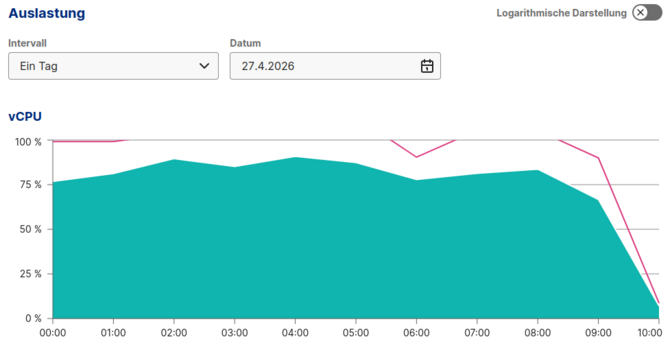
Middleware deployed at 9.30 am
From 75% utilisation down to 10% without Cloudflare or Anubis complicating the project. As the middleware only activates in response to search queries, legitimate crawlers can continue to index the site without posing a risk to SEO.
The AI bots’ thirst for knowledge is unlikely to dry up any time soon. We just need to filter it in such a way that I don’t miss out on my beauty sleep.